

General
| Client averaging | ▪ Automatic fair distribution of render clients between multiple shows/projects. ▪ Prevents “priority wars” between productions competing for the farm. | 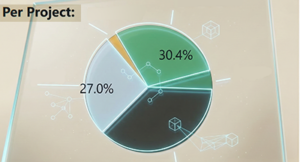 |
| Frame checking | ▪ Royal Render distances itself from simple “fire and forget” systems. ▪ Jobs are only marked “done” if frames exist on disk and are readable. ▪ Eliminates the manual artist task of verifying frames & resubmitting. |
|
| Cloud Connection | ▪ Auto-create, spin up, and shut down cloud VMs based on render load. ▪ Native support: AWS, Google Cloud, Azure. ▪ Extensible with open-source Python framework for other providers. | 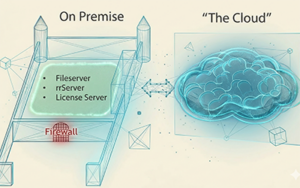 |
| User management | ▪ Full built-in permission system (view/edit/disable/change… jobs of myself / others). ▪ Assign passwords for projects or render apps (e.g. Nuke) to control jobs of this type in addition to per-user control ▪ Lock Royal Render config with rrAdmin password ▪ Easy confidential mode: only see jobs with fileserver access - no double-permission management for fileserver and farm. |
|
| Pigeonloft Webpage | ▪ Open-source web interface to monitor and control jobs that are running on-premise. ▪ May be added to any webserver/space you own. ▪ A fixed IP for your company's internet connection is not required (to retrieve data from your rrServer). |  |
| Multiple job threads per render node | ▪ Each render node can spawn up to 8 parallel job threads with separated GPU assignments. ▪ A single scheduler in one app is resource-aware. A single app eliminates the need to launch multiple rrClient instances that have huge drawbacks (Either you limitate the cores or RAM for each instance or they “fight” against each other as they do not interact with each other). ▪ Works seamlessly on RR-generated cloud VMs. (Whereas you are stuck with one job on VMs in other solutions) |
|
| Mixed environment | ▪ Royal Render knows which apps are installed on a render client. ▪ No need to create client groups for e.g. “Houdini” or any node-locked licensed app. ▪ Windows, Linux, MacOS! ▪ Same Royal Render apps for each OS. | 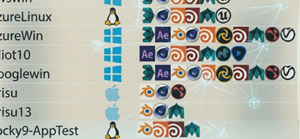 |
Artist Productivity & Artist-aware
| Save time with “Preview Render” | ▪Send a bunch of jobs. Royal Render renders a few frames of each job first and displays them. ▪Artists can quickly confirm jobs will render correctly overnight and call it a day/get home. | 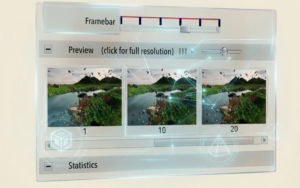 |
| Render on workstations | ▪Runs in the background with a different user and therefore different file access rights. ▪Auto-enable on logout or idle. ▪Auto-disable on high CPU or RAM usage. ▪Flexible: At night - use all cores. During working hours - disable or use fewer cores or allow Nuke only. |
|
| Tiny Queue View | ▪Compact view mode of rrControl. ▪Keep critical jobs visible on top of other apps while working. | 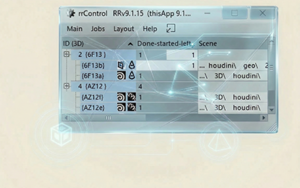 |
| Override Renderer Settings | ▪Change some settings of your renderer of your jobs without touching the scene itself to keep your production settings. ▪Example - Antialiasing: Change the sampling of your jobs to e.g. 1/4 for fast non-final renders. ▪Example - Verbose level: Set the same default verbose level no matter the scene settings or Increase the verbose to debug job issues. |
|
| View render log files | ▪Renderer output logs are saved with RR jobs. ▪Access renderer output logs from any render from any workstation for troubleshooting. | 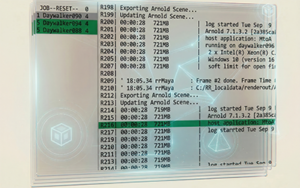 |
| Persistent Table Colors | ▪It is sad that we still have to state this as a feature in these modern times, but small details matter ▪in rrControl, jobs and clients are colour-coded according to their status. ▪The colour stays even when you select an item! (Many other render managers change the color of a selection to “rendering” … Why? Have they never used their own software themselves?) |
Communication & Collaboration
| Image overlay text/paint | ▪ Annotate preview frames directly in rrControl (e.g. mark corrections) | 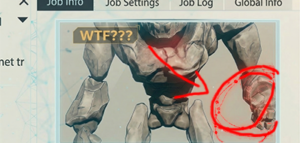 |
| Human-readable Job IDs for communication | ▪ Display a short code like {FRTM} instead of huge job cryptic database IDs. ▪ Easy for email/chat communication, link sharing (via click), internal messaging system (send message to submitting or any other machine). |
|
| Job comments | ▪ Add notes to jobs with one click | 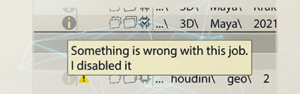 |
| Global information broadcast | ▪ Farm-wide announcements visible in rrSubmitter and rrControl. ▪ Ensures no artist misses important notices. |
Pipeline & Customization
| Shared executables/plugins | ▪ RR syncs plugin folders (V-Ray, Redshift, MtoA, HtoA, etc.) and render app folders (Blender, Nuke, Arnold, etc.) automatically to rrClients. ▪ Benefits: ▫ No per-machine installs. ▫ Support multiple renderer versions for different jobs at once. ▫ Faster and more reliable than network-mounted executables/plugins | 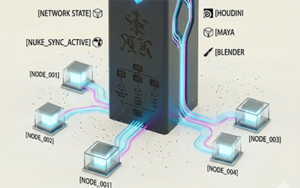 |
| REZ package support | ▪ Ships with its own REZ version. ▪ Supports custom REZ environments. |
|
| Render license restrictions | ▪ Set total usage limits for ▫ app licenses (Nuke, Maya, Houdini, Husk ….) ▫ render licenses (Arnold, Redshift) ▫ custom plugins (Reelsmart of Sapphire for Nuke, … ) ▪ Split the farm into different license pools | 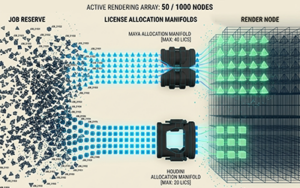 |
| Default job settings control | ▪ Define default job settings globally or scoped to: ▫ All users ▫ Non-Admins only ▫ Specific render app ▫ Specific project ▫ Specific user ▫ Specific submission machine |
|
| SDK and API | ▪ rrServer: Job event & status change plugins ▪ rrServer: Job notification plugins (e.g. triggers on finish) ▪ rrControl: Add your own job & client commands ▪ rrSubmitter: On-submission scripts, scripted jobs ▪ Jobs: Pre-/preview-/post-render command lines ▪ SDK: XML or Python-based submission ▪ APIs: 3 different Python modules, each available for different python versions | 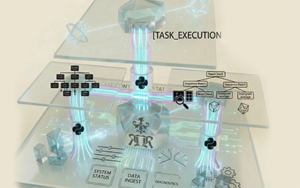 |
Error Handling & Stability
| Process tree watch | ▪ Monitors all render processes. ▪ Measures CPU & RAM usage per process. ▪ Prevents leftover zombie processes (esp. on Linux). | 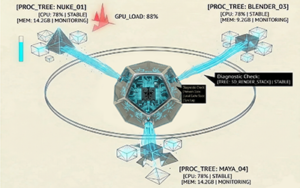 |
| Frozen detection | ▪ Detects renderer idle-on-one-core freezes. ▪ Automatically aborts the frozen process. ▪ Auto dumps stats in render log: CPU/GPU/RAM/network usage over render duration. |
|
| Comprehensive error detection | ▪ Delete unfinished frames on specific renderer error messages. ▪ Verify application exit codes. ▪ Detect frozen/idle renderer states. ▪ Frame file existence & readability checks. ▪ Frame file size checks. ▪ Frame histogram change checks (detect corrupt renders). ▪ Parse logs (real-time and/or after render). ▪ Detect & handle Windows error dialogs. ▪ Auto-disable job if it crashes too often. ▪ Remove unstable client from job if it crashes too often. ▪ Verify drive mappings, folder access & disk space before rendering. ▪ ... | 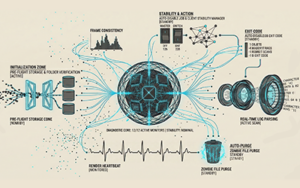 |
Monitoring, Analysis & Reporting
| Basic and advanced performance analysis | ▪ Collects the CPU, GPU, RAM and network traffic usage per frame ▪ 5 checkpoints saved per frame → identify bottlenecks (start, middle, end) ▪ A performance analysis overview shows machine comparison overview (low, average, max) in categories like CPU peak, over all CPU usage, Render Time, GPU, RAM. ▪ Option to save detailed stats for every minute of a render into the render log for in-depth bottleneck analysis. | 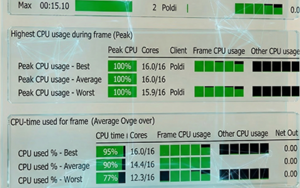 |
| Statistics and History DB | ▪ Global stats like over all client usage, job/frame count, rrServer CPU/RAM, .. ▪ Collects metrics per user, project, and render app (job counts, frame counts, memory, CPU usage, ..) ▪ Each client logs CPU/RAM usage, job status, … ▪ Deleted jobs are saved into a history DB. |
|
| Realm Reporter | ▪ Read all of RRs statistical data, job queue and job history ▪ Generate pie, line, bar charts & tables via Python. ▪ Export to PDF or PNG. ▪ Schedule automatic reports (daily/weekly/monthly). | 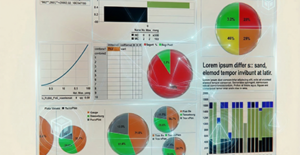 |
Job Management
| Job approval stages | ▪ Stop after a few frames → verify render times, avoid wasting CPU if the scene fails. ▪ Stop after all frames → wait for manual approval before delivery, allow scripts (e.g. push frames to edit). ▪ Cloud rendering gated by approval → prevent unapproved jobs from burning cloud budget. ▪ Custom approval checkbox → flag jobs for internal communication/visibility. |  |
| Job priority adjustment | ▪ Dynamic priority tuning for the whole farm beyond simple priority numbers of each job. ▪ Average all machines between different projects/shows. ▪ No need to split farm into groups, it may lead to idle machines. ▪ Example: dedicate machines XY to Houdini or a specific show first. ▪ Example: Houdini .usd creation is always more important than .usd rendering. ▪ Example: Ensure a project with a deadline in 3 days gets a guaranteed share of render clients. |
Supported Render Apps
 3ds Max
 Blender
 Cinema 4D
 Maya
Maya Houdini
 Unreal
 Katana
 Softimage
 Terragen
 Modo
Modo Lightwave
 Keyshot
 Rhino
Rhino VRed
VRed messiahStudio
 Clarisse IFX
 Arnold .ass .usd
  Husk .usd (Houdini)
- Mantra .ifd (Houdini)
 Octane
  Redshift .rs
  VRay .vrscene
  Renderman .rib .usd
 Nuke
Nuke  After Effects
  FFMPEG
  Fusion
  ToonBoom Harmony
  Topaz Video Enhance AI
 - Autopano Video
- Innobright Altus
- Nokia OZO
